See the estate
Health scans, monitoring, metadata intelligence, and the data dictionary show what deserves attention.
For Salesforce operations
POCAVI gives operations teams a living view of org health, metadata, dependencies, data, access, and recovery so they can prevent issues rather than discover them in production.
The operating rhythm
Start with the responsibility your team already owns. POCAVI gives it a more connected route from signal to action.
Health scans, monitoring, metadata intelligence, and the data dictionary show what deserves attention.
Trace dependencies and field references before a change becomes a wider problem.
Use the operational context, sandbox tools, and recovery points needed for confident action.
Retain history around scans, changes, and recovery so the operating picture improves over time.
POCAVI Admin
Explore the product depth behind this workflow, then expand when shared Salesforce context makes the next decision better.
Plan a technical evaluationSalesforce admins and platform owners
Most admin work is reactive because the estate is only visible one screen at a time. The first sign of a problem is usually somebody else reporting it.
What changes
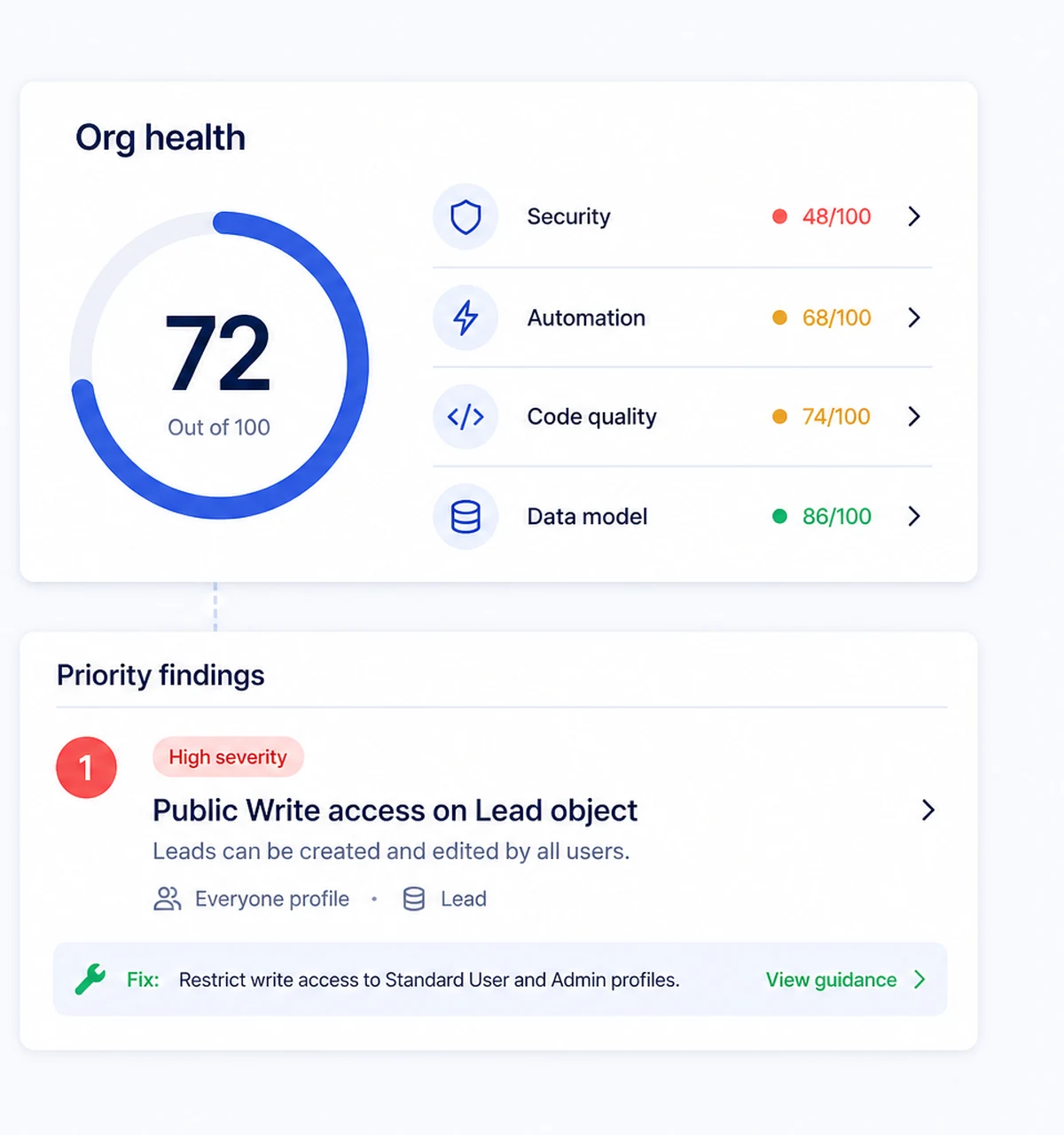
A deep scan across twenty-three check modules ranks findings by what they actually put at risk, so the morning starts with a priority rather than a search.
What changes
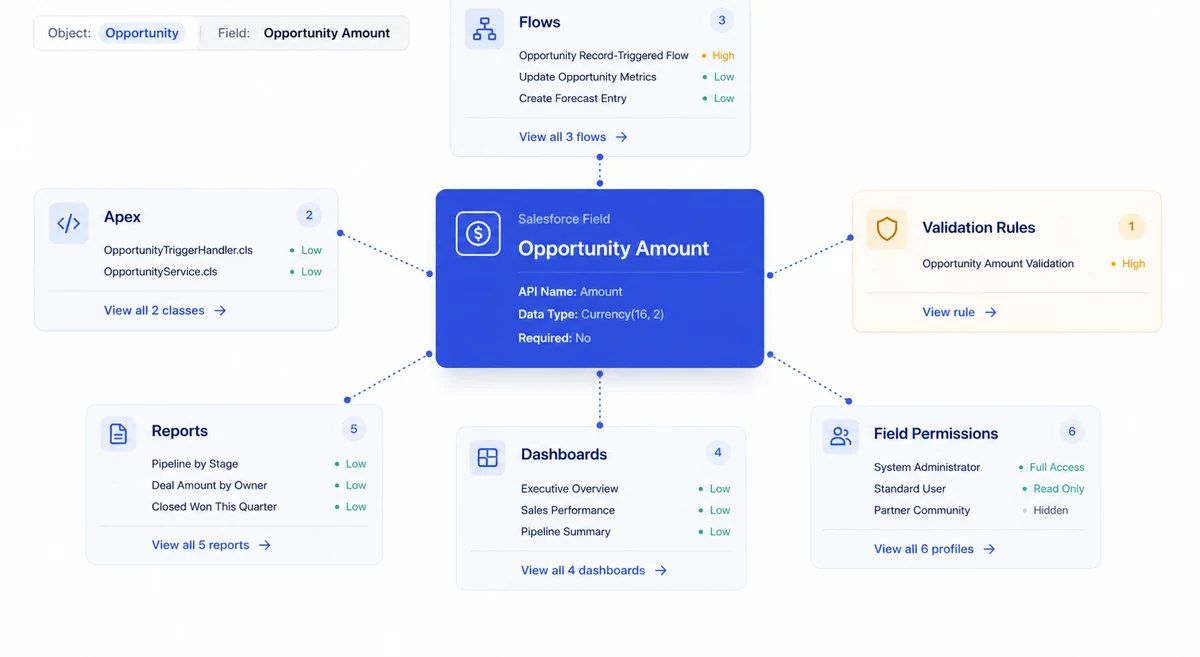
Field impact traces every flow, class, report, layout and rule that depends on a field. The blast radius is visible before the change, not discovered after it.
What changes
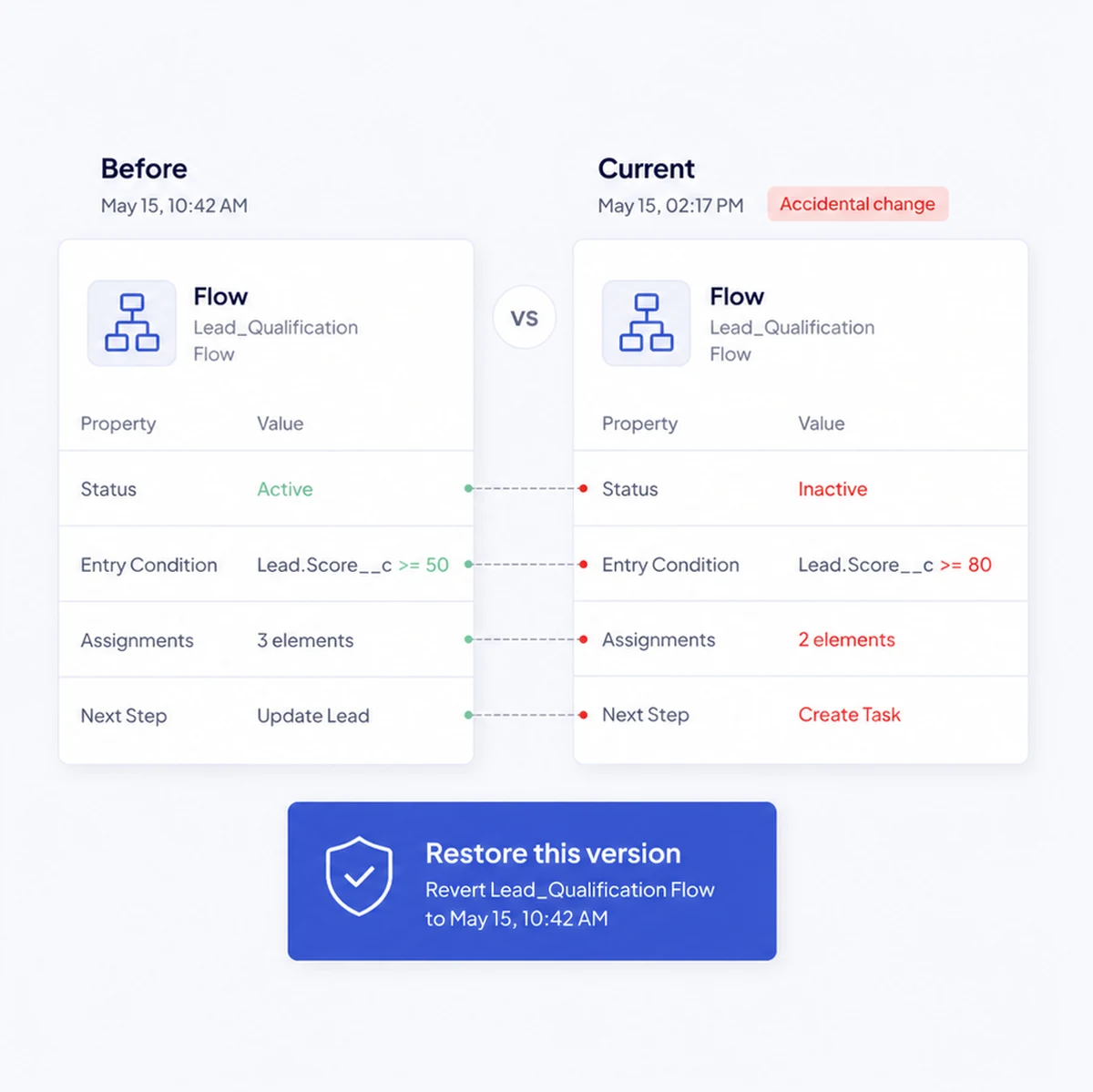
Versioned metadata snapshots, a diff of exactly what moved, and a revert to the version from before lunch. Backups are read-only until you ask for a restore.
Capabilities
The Admin product turns routine Salesforce maintenance into a controlled operating rhythm.
Metadata Backup and Recovery Creates metadata snapshots, visual diff, scheduled backup, and point-in-time rollback.
Field Impact Analysis Finds a field's dependencies across code, flows, rules, layouts, reports, templates, and security before change.
Data Loader and Field Mapping Loads, updates, upserts, or deletes CSV data with mapping, job history, and revert context.
Field Creator Bulk-creates custom fields and objects, with validation, AI suggestions, and assignment to access and layouts.
Picklist Manager Finds picklist values and references, then supports a safe rename with history.
Roll-up Helper Builds and manages parent-child roll-ups with generated Apex, testing, and deployment support.
Automation Map Maps the triggers, flows, and automations on an object, including execution order and recursion risk.
Lookup Filter Manager Lists lookup filters and their criteria, with controls for active state and user-facing errors.
Calculated Field Builder Creates computed field values with a visual builder, dry-run preview, AI assistance, and publishing controls.
Bypass Framework Suggester Audits validation rules, flows, and triggers to recommend a consistent bypass framework and deployment plan.
Calculated Field Templates Provides ready-made calculated-field starting points with block flow and source-object context.
Calculated Field Variables and Audit Manages reusable org-scoped variables, references, schedules, webhooks, and execution history.
Sandbox Seeding and Management Seeds realistic Salesforce data while preserving relationships and helping teams manage sandbox lifecycle.
Sandbox Manager and Comparison Lists, creates, and compares Developer, Developer Pro, Partial, and Full Salesforce sandboxes.
Questions
Connect an org through OAuth and run a quick scan: ten checks, about a minute end to end. A deep scan runs all twenty-three and takes a few minutes more.
No. There is no managed package. Pocavi reads metadata through the Salesforce API using an OAuth connection you can revoke at any time.
Scanning, backup and analysis are read-only. Nothing is written to the org until you explicitly deploy, load or restore.
Read next
A practical guide to health checks, metadata intelligence, field impact, monitoring, safe change, and recovery for Salesforce teams.
Read the Admin guideA field change is rarely only a field change. Start by tracing the dependencies across automation, code, layouts, reports, security, and integrations. Then make the change with a recovery point already prepared.
Explore AdminThe product behind this
Understand the estate. Diagnose the risk. Change it safely.